

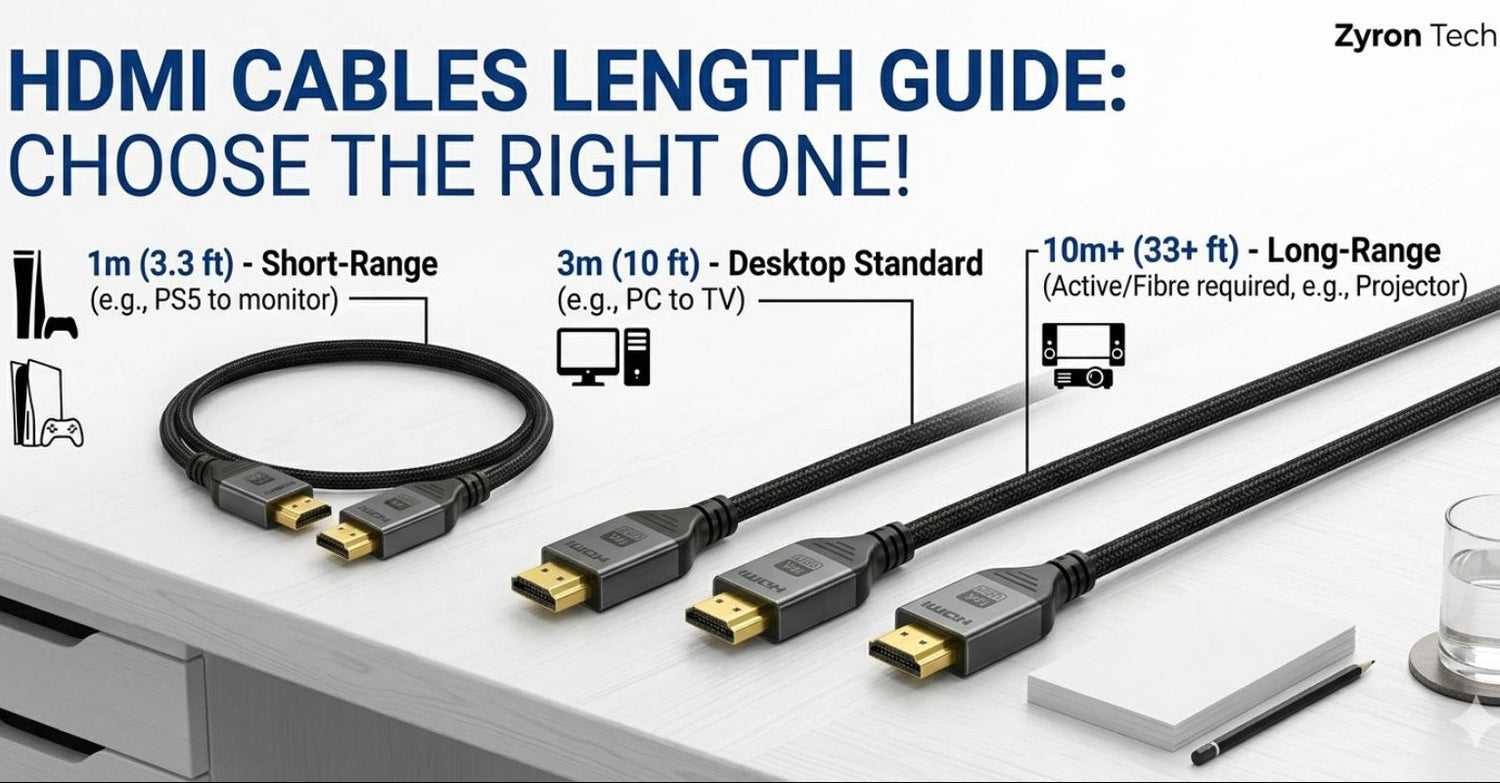
The ideal HDMI cable length for most setups is 2 metres, as it provides enough flexibility without risking signal loss. For longer distances, especially above 5 metres with high-performance setups like 4K 120Hz, an active or fibre optic HDMI cable is recommended.
Picking out an HDMI cable seems like a "set and forget" task. You just grab the first one you see that looks long enough, right? Not exactly. While it might seem trivial, the distance between your PlayStation, PC, or Fetch box and your TV actually impacts your screen's performance. Choosing a cord that is too short leaves you with a tight, strained connection, while an unnecessarily long one can lead to clutter or, worse, a flickering signal.
This hdmi cable length guide is designed to help Australian home and office users pick the perfect fit. We’ll look at when length starts to hurt your resolution and how to measure your space like a pro.
Why Cable Length Matters More Than You Think
HDMI transmits data through digital signals, which creates difficulties for its operation, yet its performance remains bound by physical laws. The electrical signal experiences resistance as it moves through the copper wire. The signal will lose strength when it travels through a wire which exceeds its optimal length. This phenomenon receives the name of signal attenuation.
The current situation presents greater risks than what existed ten years ago. A basic 1080p signal functions with minimal bandwidth requirements which allow it to travel over long distances. The HDMI 2.1 signals that have a high performance transmit 120Hz 4K and 60Hz 8K content through data at 48Gbps. The high-speed signals exhibit increased sensitivity to interference. The combination of a large low-grade cable with your advanced gaming equipment will cause your display to show "snow" and drop frames and experience complete black-outs.
HDMI Signal Degradation: Finding the Max Length
How long can an HDMI cable be before you run into trouble? The answer depends on the resolution which you are attempting to transmit. Here is a quick look at the reliable limits for "passive" cables (standard copper cables without built-in boosters).

For 95% of Australian living rooms, you’ll be well under these limits. Most people find that an HDMI cable 2m long is the "Goldilocks" zone, not too short to reach, but not long enough to lose signal quality.
Best Length for Common Home & Office Setups
The Standard Entertainment Unit
Most Australian homes have a television which sits on a wooden stand that has a console or set-top box placed on its lower shelf. The distance between them usually remains under one metre. A 2m cable is perfect here. It gives you enough slack to pull the console out to clean behind it or swap a disc without yanking the port on your expensive TV.
- Top Pick: 2m
The Wall-Mounted TV
Wall mounting looks great, but it adds "hidden" distance. You aren't just going from point A to point B; the cable often has to travel down inside the wall cavity or through a plastic conduit. A 3m cable is often safer here. Always measure the path the cable actually takes, not just the straight line between the devices.
- Top Pick: 2m to 3m (Check your routing first!)
The Desktop Gaming Setup
If your PC tower sits on your desk right next to your monitor, a 1m or 1.5m cable is neat. But if you use a monitor arm that moves, or if your PC is on the floor, you’ll need that extra reach. An hdmi cable 2m vs 3m choice here usually comes down to how much you move your screen.
- Top Pick: 2m
Home Cinema & Projectors
Projectors function as the single exception to this rule. The distance between your ceiling-mounted projector and your front room receiver will exceed 10 meters. The presence of low-quality passive cables should be avoided for 4K HDR content because they cannot handle the specified distances.
- Top Pick: Measure exactly, then add 50cm for the corners. Use an "Active" cable for anything over 5m if gaming at 4K 120Hz.
2m vs 3m: Which one should you choose?
Still not sure how long hdmi cable units should be for your specific room? Use this simple rule of thumb:

Zyrontech Tip: When in doubt, go for the 2m. It’s the best hdmi cable length for almost every modern Australian apartment or house setup. It handles the 48Gbps requirements of HDMI 2.1 perfectly without the signal loss found in cheap, bulky 10m cords.
What is the Best HDMI Cable Length?
For most home setups, a 2m HDMI cable is the best choice. It provides enough flexibility for setup adjustments while maintaining optimal signal quality, especially for modern HDMI 2.1 devices.
The Zyrontech Range: HDMI Cable Length Options for Reliable Performance
We’ve focused our range on the lengths that actually work without compromise. Our HDMI 2.1 cable 2m is our best-seller for a reason. It supports full 8K, 4K 120Hz, VRR, and eARC, all while fitting neatly behind your entertainment unit.
We provide fast and free shipping throughout Australia for standard HDMI cable 2m and high-speed HDMI cable 2m which you require for your office and PS5 needs respectively.
Frequently Asked Questions
Is there an hdmi cable max length?
There isn't a hard "legal" limit in the HDMI spec, but physics sets a practical one. For the best 4K 120Hz performance, you really want to stay under 5m for a standard copper cable. Any longer and you should look at "Active" or Fiber Optic HDMI.
What is an "Active" HDMI cable?
The active cable contains a small chip which increases the strength of the transmitted signal. Your data travels through the cable system while its system functions as a megaphone. The "directional" feature requires one end to connect with the TV while the other end connects with the source device. These cables function well for distances that extend beyond 10 meters.
Does a longer cable cause input lag?
The speed of electricity advances so quickly that humans cannot perceive any delay which arises from cable length. A cable which exceeds the proper length will create synchronization problems together with visual flickering which represents a more severe issue than timing delays.
Can I just use a joiner/coupler?
A single continuous cable which matches your required length is always superior to connecting two shorter cables through daisy chaining.
Need more help?
Check out our HDMI Cable Not Working: Troubleshooting Guide or dive into our Complete HDMI Cable Buying Guide to make sure you're getting the right tech for your home.


Leave a comment
All comments are moderated before being published.
This site is protected by hCaptcha and the hCaptcha Privacy Policy and Terms of Service apply.